Shortcuts
Note
Every tool and action in Vertex Studio can be bound to a key of your choice, see Bindable shortcuts, but notice that the majority them DO NOT HAVE A SHORTCUT ASSIGNED by default. You can acess the ones not bound byt a shortcut through the main panel or the “Tools and Tool Settings popup” (activated with Ctrl+F in the 3D viewport).
Vertex Studio’s shortcuts only fire while its panel is open and a MeshInstance3D is selected, so they don’t take keys away from the rest of the editor.
Default shortcuts
Action |
Keybinding |
|---|---|
Brush |
B |
Eraser |
Shift+E |
Increase brush size |
] |
Decrease brush size |
[ |
Increase opacity |
/ |
Decrease opacity |
\ |
Cycle swatches and colors |
X (also cycles between Hard and Normal when in “Paint Normals”) |
Tools and Tool Settings popup (open at the mouse position in the 3D viewport) |
Ctrl+F |
Fill (bucket fill everything or the current selection) |
G |
Lasso selection |
L |
Deselect all |
Shift+L |
Tip
The brush size and opacity keys work like in painting applications: tap for a single step, or hold the key to keep growing/shrinking the brush and raising/lowering the opacity.
Note
Brush size has no effect on the Paint Precision tool (it paints one vertex at a time) and opacity has no effect on Paint Normals (a normal is either hard or smooth), so those keys do nothing while those tools are active.
Bindable shortcuts
All of Vertex Studio’s actions are bindable, including the ones that ship without a key. They live in Project Settings > General > Vertex Studio > Shortcuts, grouped by category (Brush, Tools, Actions, View, Material and Source Mesh).
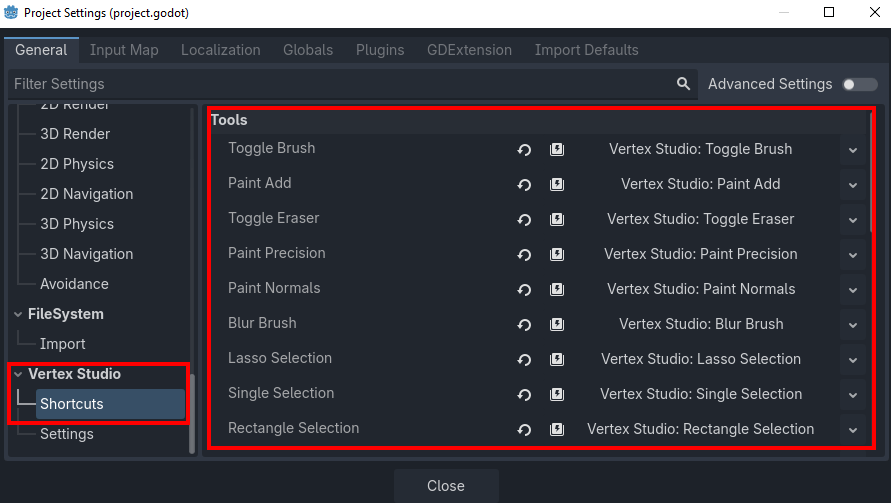
To bind or rebind a key:
Open Project > Project Settings > General and scroll down to the Vertex Studio > Shortcuts section.
Pick a category and click the value of the action you want (it reads
Vertex Studio: <action>) to expand the shortcut.Under Events, edit the existing entry or add a new
InputEventKey, then set its Keycode and the modifiers you want (Shift, Alt, Ctrl/Cmd).To remove a shortcut, delete its entry from Events and leave the list empty.
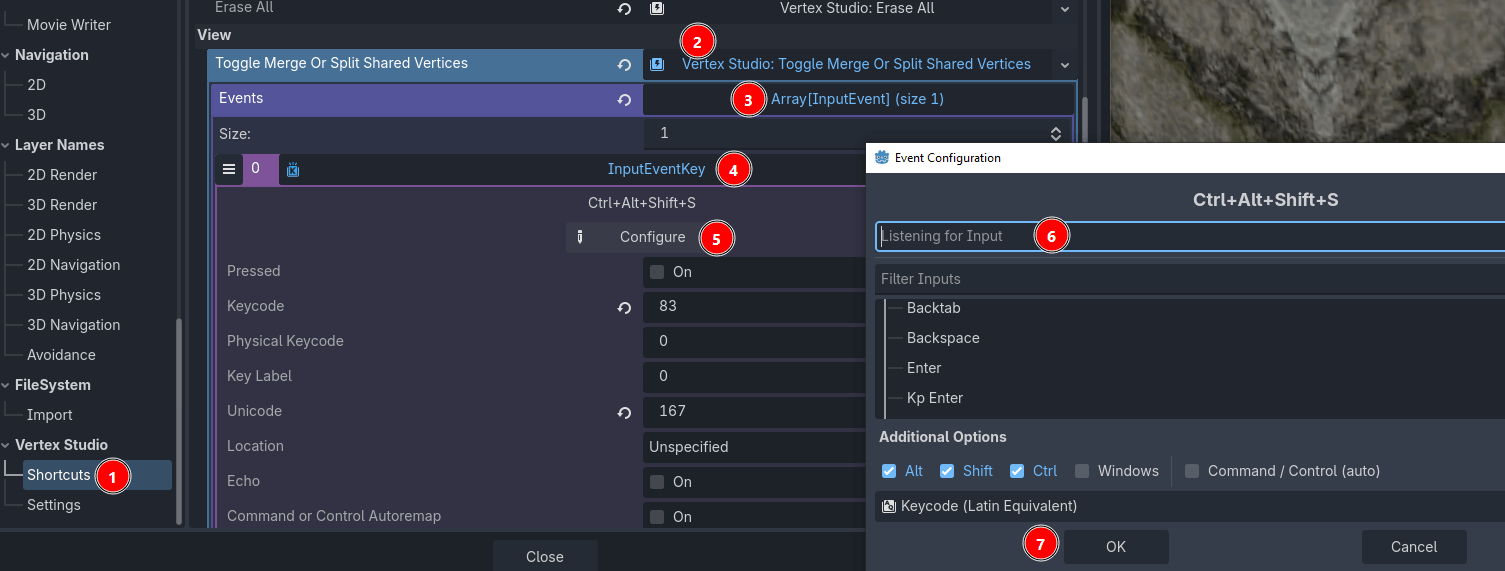
Bindings are written to project.godot as soon as you change them, which means they belong to the project (and to version control), not to your editor installation. Since they are Godot Shortcut resources, the same binding works on Windows, Linux and macOS, and a binding made with Ctrl is automatically Cmd on macOS.
These are all the bindable actions, with their default keys:
Category |
Action |
Default |
|---|---|---|
Brush |
Increase Size |
] |
Brush |
Decrease Size |
[ |
Brush |
Increase Opacity |
/ |
Brush |
Decrease Opacity |
\ |
Brush |
Open Tool Popup |
Ctrl+F |
Brush |
Cycle Swatch Color |
X |
Tools |
Toggle Brush |
B |
Tools |
Paint Add |
unbound |
Tools |
Toggle Eraser |
Shift+E |
Tools |
Paint Precision |
unbound |
Tools |
Paint Normals |
unbound |
Tools |
Blur Brush |
unbound |
Tools |
Lasso Selection |
L |
Tools |
Single Selection |
unbound |
Tools |
Rectangle Selection |
unbound |
Tools |
Ellipse Selection |
unbound |
Tools |
Select Linked |
unbound |
Tools |
Invert Selection |
unbound |
Tools |
Deselect |
Shift+L |
Actions |
Fill All Or Selection |
G |
Actions |
Erase All |
unbound |
View |
Toggle Merge Or Split Shared Vertices |
unbound |
View |
Show Front Verts Only |
unbound |
Material |
Restore Material |
unbound |
Mesh Tools |
Resync Uvs |
unbound |
Mesh Tools |
Export As Obj |
unbound |
Mesh Tools |
Export As Gltf |
unbound |
Mesh Tools |
Re Export |
unbound |
Note
Most actions ship unbound on purpose, to avoid stepping on Godot’s own 3D viewport shortcuts. Bind them as you wish.
Note
In the free edition, binding a key to a Pro-only tool is allowed, but pressing it shows the same upgrade dialog the panel button does. See Features.
Tip
The rest of Vertex Studio’s Project Settings are explained in Project Settings.