Vertex Groups
Note
This feature requires Vertex Studio Pro ⭐.
A Vertex Group is a named selection saved onto the mesh, exactly like Blender’s vertex groups. Instead of re-selecting the same vertices every time you come back to a model (for example: the bottom of a rock where you paint ambient occlusion, the leaves of a tree, the eyes of a character), you select them once, save the group, and re-select them later with a double-click.
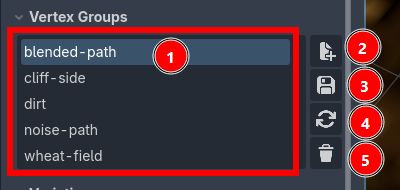
The list of groups saved on this mesh. Click a group to make it the active one, double-click it to select its vertices in the viewport.
New: create a group from the current selection. It asks for a name, and it’s only available while there is an active selection.
Save: overwrite the active group with the current selection.
Reload: select the vertices stored in the active group (the same as double-clicking it).
Delete: remove the active group.
Usage
Select the vertices you want with any of the Selection Tools.
Expand
Vertex Groupsand click the+button, then name the group.Whenever you need that selection again, double-click the group name.
If you make changes to a selection and want to update the vertex group, click the
Savebutton.
Tip
Groups are just selections, so everything that respects a selection respects them: after reloading a group, the brush, the eraser and Fill Selection only affect those vertices that are selected, just like when you select them manually.
Where the groups are stored
Groups are saved per mesh, so they follow the MeshInstance3D and are still there when you reopen the project. They are written both onto the node and into res://.vertex_studio/scene_data.cfg, a project file you can commit to version control. See Project Settings.
Groups store vertex positions, not vertex indices. That’s on purpose: it means a group survives topology changes, so if you later split or weld vertices with the Paint Normals brush (see Merge and Split Shared Vertices), the group still selects the right corners.
Vertex Groups and Variations
Every Variation carries its own set of vertex groups, captured when the variation is saved.
Warning
Loading a variation replaces the mesh’s vertex groups with the ones stored in that variation. If the variation was saved before you created a group (or with no groups at all), that group is gone from the mesh after loading it. Save the variation again after creating groups you want to keep.